<?xml version="1.0" encoding="utf-8"?><feed xmlns="http://www.w3.org/2005/Atom" ><generator uri="https://jekyllrb.com/" version="4.4.1">Jekyll</generator><link href="https://silentsblog.com/feed/updates.xml" rel="self" type="application/atom+xml" /><link href="https://silentsblog.com/" rel="alternate" type="text/html" /><updated>2026-11-01T09:57:07+00:00</updated><id>https://silentsblog.com/feed/updates.xml</id><title type="html">Silent’s Blog | Updates</title><subtitle>A blog and portfolio featuring my game modifications, patches, and technical writeups for PC and console games.</subtitle><entry xml:lang="en"><title type="html">Tokyo Xtreme Racer – Blur Removal patches (and more)</title><link href="https://silentsblog.com/updates/2026/11/01/tokyo-xtreme-racer-blur-removal-patches/" rel="alternate" type="text/html" title="Tokyo Xtreme Racer – Blur Removal patches (and more)" /><published>2026-11-01T00:00:00+00:00</published><updated>2026-11-01T00:00:00+00:00</updated><id>https://silentsblog.com/updates/2026/11/01/tokyo-xtreme-racer-blur-removal-patches</id><content type="html" xml:base="https://silentsblog.com/updates/2026/11/01/tokyo-xtreme-racer-blur-removal-patches/"><![CDATA[<p>A set of new patches for the Tokyo Xtreme Racer is now out:</p>
<ul>
  <li>Remove Blur patches – removes a 1-line offset from the blurring effect, preserving the Depth of Field. Improves image clarity, especially when upscaling.
Already shipped with the latest nightly PCSX2.</li>
  <li>Raindrops In All Camera Modes – makes on-screen rain droplets display in all camera modes.</li>
</ul>

<p>Patches are available for all regional releases of:</p>
<ul>
  <li>Tokyo Xtreme Racer 3</li>
  <li>Tokyo Xtreme Racer: Drift</li>
  <li>Kaido Racer</li>
  <li>Tokyo Xtreme Racer: Drift 2</li>
  <li>Racing Battle: C1 Grand Prix</li>
</ul>

<p>In PCSX2, Remove Blur patches are also available for Fu-un Bakumatsu-den, Fu-un Shinsengumi and Ninkyouden: Toseinin Ichidaiki – I’ll add them to the blog at a later point.</p>

<p><a href="/mods/consoles/#ps2" class="button" target="_blank"><i class="fas fa-download"></i> Go to Mods &amp; Patches</a></p>]]></content><author><name></name></author><summary type="html"><![CDATA[A set of new patches for the Tokyo Xtreme Racer is now out: Remove Blur patches – removes a 1-line offset from the blurring effect, preserving the Depth of Field. Improves image clarity, especially when upscaling. Already shipped with the latest nightly PCSX2. Raindrops In All Camera Modes – makes on-screen rain droplets display in all camera modes.]]></summary><media:thumbnail xmlns:media="http://search.yahoo.com/mrss/" url="https://silentsblog.com/assets/img/avatar.jpg" /><media:content medium="image" url="https://silentsblog.com/assets/img/avatar.jpg" xmlns:media="http://search.yahoo.com/mrss/" /></entry><entry xml:lang="en"><title type="html">Tokyo Xtreme Racer: Drift – Japanese Soundtrack</title><link href="https://silentsblog.com/updates/2026/10/15/tokyo-xtreme-racer-drift-japanese-soundtrack/" rel="alternate" type="text/html" title="Tokyo Xtreme Racer: Drift – Japanese Soundtrack" /><published>2026-10-15T00:00:00+00:00</published><updated>2026-10-15T00:00:00+00:00</updated><id>https://silentsblog.com/updates/2026/10/15/tokyo-xtreme-racer-drift-japanese-soundtrack</id><content type="html" xml:base="https://silentsblog.com/updates/2026/10/15/tokyo-xtreme-racer-drift-japanese-soundtrack/"><![CDATA[<p>A patch fixing soundtrack assignment issues in TXR Drift, making the music match the original release of Kaidō Battle:</p>
<ul>
  <li>Working unique music for the <strong>Night Conquest Menu</strong> and <strong>Night Parking Lot</strong>.</li>
  <li>Correct selection of <strong>Night Race</strong> and <strong>Night Replay</strong> music, matching KB.</li>
  <li>Fixed boss races using wrong music for the intros, and using a generic <strong>Race Night</strong> music during the battle.</li>
  <li>Fixed the incorrect music titles in the Music Player, and re-added “Deadly” and “Going Home” to the selection.</li>
</ul>

<figure class="iframe-entry"><iframe src="https://www.youtube.com/embed/fVi0yhp9z_4" allowfullscreen=""></iframe></figure>

<p><a href="/mods/tokyo-xtreme-racer-drift/#jp-soundtrack" class="button" target="_blank"><i class="fas fa-download"></i> Download Japanese Soundtrack</a></p>]]></content><author><name></name></author><summary type="html"><![CDATA[A patch fixing soundtrack assignment issues in TXR Drift, making the music match the original release of Kaidō Battle: Working unique music for the Night Conquest Menu and Night Parking Lot. Correct selection of Night Race and Night Replay music, matching KB. Fixed boss races using wrong music for the intros, and using a generic Race Night music during the battle. Fixed the incorrect music titles in the Music Player, and re-added “Deadly” and “Going Home” to the selection.]]></summary><media:thumbnail xmlns:media="http://search.yahoo.com/mrss/" url="https://silentsblog.com/assets/img/avatar.jpg" /><media:content medium="image" url="https://silentsblog.com/assets/img/avatar.jpg" xmlns:media="http://search.yahoo.com/mrss/" /></entry><entry xml:lang="en"><title type="html">GTA SilentPatch 2026 Update Hotfix #1</title><link href="https://silentsblog.com/updates/2026/08/15/silentpatch-2026-update-hotfix-1/" rel="alternate" type="text/html" title="GTA SilentPatch 2026 Update Hotfix #1" /><published>2026-08-15T00:00:00+00:00</published><updated>2026-08-15T00:00:00+00:00</updated><id>https://silentsblog.com/updates/2026/08/15/silentpatch-2026-update-hotfix-1</id><content type="html" xml:base="https://silentsblog.com/updates/2026/08/15/silentpatch-2026-update-hotfix-1/"><![CDATA[<p>The first hotfix for the 2026 update for <a href="/silentpatch/">SilentPatch for the Grand Theft Auto games</a> is now out.
This hotfix includes a few new smaller fixes, and addresses several known issues introduced by the latest update,
<strong>including a critical issue with the Purple Nines in GTA III still spawning after the mission</strong>,
and fixes incompatibilities with multiple mods, most notably with Maxo’s Vehicle Loader. Updating is strongly advised.</p>

<p class="flexible-buttons"><a href="/mods/gta-iii/#silentpatch" class="button" target="_blank"><i class="fas fa-download"></i> Download for GTA III</a>
<a href="/mods/gta-vc/#silentpatch" class="button" target="_blank"><i class="fas fa-download"></i> Download for GTA Vice City</a>
<a href="/mods/gta-sa/#silentpatch" class="button" target="_blank"><i class="fas fa-download"></i> Download for GTA San Andreas</a></p>

<p><strong>If in GTA III you used the latest build of SilentPatch and saved your game after finishing ‘Rumble’, Purple Nines persisted in your save.
Once you update SilentPatch, you may use this CLEO script to undo the damage caused by this issue. Simply put this CLEO script in your game,
load the affected save, then save again. After that, the script may be safely deleted:</strong></p>

<p><a href="https://github.com/CookiePLMonster/SilentPatch/releases/latest/download/PurpleNinesFix.cs" class="button"><i class="fas fa-download"></i> Download CLEO repair script</a></p>

<h2 id="new-fixes"><a href="#new-fixes"></a>New fixes</h2>
<ul>
  <li><em>(GTA SA):</em> Trains can now be saved in garages, and the game no longer crashes when spawning stored trains.</li>
  <li><em>(GTA SA):</em> SBFYSTR and SWFYSTR now have their correct voices.</li>
  <li><em>(GTA SA):</em> The GANGS and CRIMES section names are no longer swapped when exporting stats to stats.html (contributed by <strong>sndth</strong>).</li>
  <li><em>(GTA VC):</em> Fixed a memory corruption in the ice cream attractor effect generation function. This resulted in less customers getting generated in the Distribution mission.</li>
  <li><em>(GTA III):</em> Two broken graffiti attractors in Portland now work correctly, so pedestrians can stare at them.</li>
  <li><em>(GTA III):</em> Cutscene borders now scale to resolution correctly. This issue looked especially bad when <code class="language-plaintext highlighter-rouge">ConsoleBottomTextPlacements</code> was enabled.</li>
  <li><em>(GTA III):</em> Colored big messages (seen in ‘Uzi Money’ and ‘Espresso-2-Go’) now fade properly.</li>
  <li><em>(GTA III):</em> Cutscenes no longer repair engines of blown up cars.</li>
  <li><em>(GTA III):</em> Entering the Ambulance no longer reduces the player’s health if it’s at over 100HP.</li>
</ul>

<h2 id="regression-and-mod-compatibility-fixes"><a href="#regression-and-mod-compatibility-fixes"></a>Regression and mod compatibility fixes</h2>
<ul>
  <li><em>(GTA SA):</em> Fixed a startup crash in SA-MP.</li>
  <li><em>(GTA SA):</em> Cursor clipping fix is now disabled in SA-MP, which should fix issues with custom dialog boxes.</li>
  <li><em>(GTA SA):</em> <code class="language-plaintext highlighter-rouge">SmallSteamTexts</code> no longer defaults to enabled in 1.0.</li>
  <li><em>(GTA SA):</em> CJ’s new shooting lines now work when <strong>fastman92 Limit Adjuster</strong> is installed.</li>
  <li><em>(GTA SA):</em> The car dirt fix has been simplified to reduce changes to the game data structures. This ensures better compatibility with mods.</li>
  <li><em>(GTA SA):</em> Characters no longer use the new “sprayed” pain sound when they’re whipped by CJ holding the spray can, tear gas, or fire extinguisher.</li>
  <li><em>(GTA III, GTA VC, GTA SA):</em> <code class="language-plaintext highlighter-rouge">UseDesktopRefreshRate</code> now only takes effect when no other mod changes the target refresh rate.
 This should improve compatibility with Framerate Vigilante.</li>
  <li><em>(GTA VC):</em> Fixed a crash near water when <strong>Maxo’s Vehicle Loader</strong> is installed.</li>
  <li><em>(GTA III):</em> <strong>Fixed a regression that caused Purple Nines to re-appear after finishing any mission, even after finishing ‘Rumble’.</strong></li>
  <li><em>(GTA III):</em> Fixed an oversize version number in the 1.1 and Steam executables.</li>
  <li><em>(GTA III):</em> Improved LC01 detection.</li>
</ul>]]></content><author><name></name></author><summary type="html"><![CDATA[The first hotfix for the 2026 update for SilentPatch for the Grand Theft Auto games is now out. This hotfix includes a few new smaller fixes, and addresses several known issues introduced by the latest update, including a critical issue with the Purple Nines in GTA III still spawning after the mission, and fixes incompatibilities with multiple mods, most notably with Maxo’s Vehicle Loader. Updating is strongly advised.]]></summary><media:thumbnail xmlns:media="http://search.yahoo.com/mrss/" url="https://silentsblog.com/assets/img/avatar.jpg" /><media:content medium="image" url="https://silentsblog.com/assets/img/avatar.jpg" xmlns:media="http://search.yahoo.com/mrss/" /></entry><entry xml:lang="en"><title type="html">SilentPatch for Grand Theft Auto: 2026 Update</title><link href="https://silentsblog.com/updates/2026/07/31/silentpatch-2026-update/" rel="alternate" type="text/html" title="SilentPatch for Grand Theft Auto: 2026 Update" /><published>2026-07-31T00:00:00+00:00</published><updated>2026-07-31T00:00:00+00:00</updated><id>https://silentsblog.com/updates/2026/07/31/silentpatch-2026-update</id><content type="html" xml:base="https://silentsblog.com/updates/2026/07/31/silentpatch-2026-update/"><![CDATA[<p>After SilentPatch went open source in late 2024, it’s time for another update. The community created hundreds of reports on GitHub, and many discoveries were made that culminated in this SilentPatch update being <strong>the biggest content update to date</strong>: over 100 new fixes were introduced across the trilogy, many of which restore content that was shipped in the game but didn’t work due to miscellaneous issues.</p>

<p>Check out the blog post for a detailed writeup, lots of presentations, and the download links:
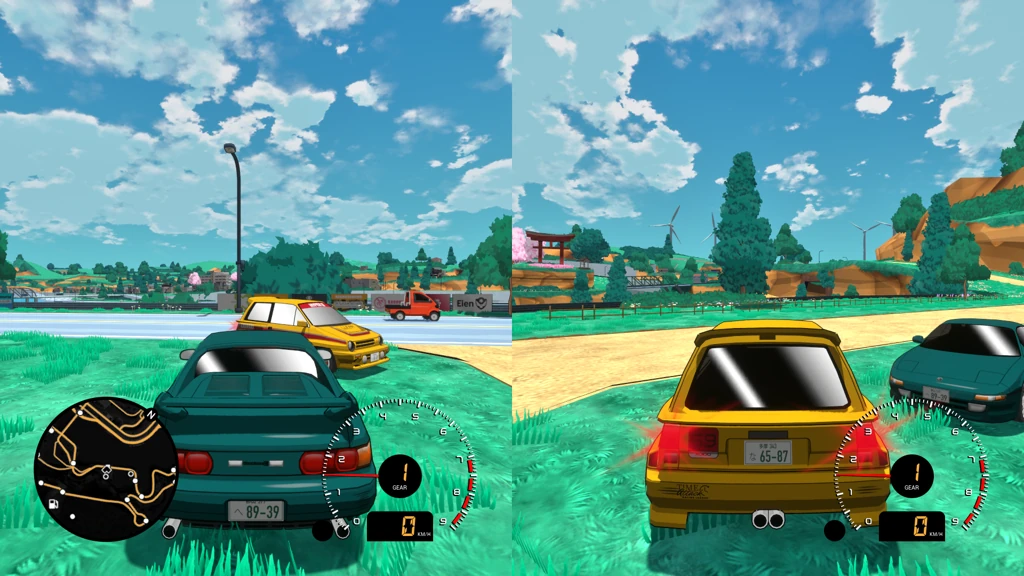
<a href="/2026/07/31/silentpatch-2026-update/">SilentPatch for Grand Theft Auto: 2026 Update</a>.</p>]]></content><author><name></name></author><summary type="html"><![CDATA[After SilentPatch went open source in late 2024, it’s time for another update. The community created hundreds of reports on GitHub, and many discoveries were made that culminated in this SilentPatch update being the biggest content update to date: over 100 new fixes were introduced across the trilogy, many of which restore content that was shipped in the game but didn’t work due to miscellaneous issues.]]></summary><media:thumbnail xmlns:media="http://search.yahoo.com/mrss/" url="https://silentsblog.com/assets/img/avatar.jpg" /><media:content medium="image" url="https://silentsblog.com/assets/img/avatar.jpg" xmlns:media="http://search.yahoo.com/mrss/" /></entry><entry xml:lang="en"><title type="html">Kaido Genkai (Demo): Freeroam Split-Screen</title><link href="https://silentsblog.com/updates/2026/06/09/kaido-genkai-demo-freeroam-splitscreen/" rel="alternate" type="text/html" title="Kaido Genkai (Demo): Freeroam Split-Screen" /><published>2026-06-09T00:00:00+00:00</published><updated>2026-06-09T00:00:00+00:00</updated><id>https://silentsblog.com/updates/2026/06/09/kaido-genkai-demo-freeroam-splitscreen</id><content type="html" xml:base="https://silentsblog.com/updates/2026/06/09/kaido-genkai-demo-freeroam-splitscreen/"><![CDATA[<p>Today, a long-awaited demo of <a href="https://store.steampowered.com/app/4581870/Kaido_Genkai_An_Anime_Racing_RPG_Demo/" target="_blank">Kaido Genkai</a>
has been released, and with it, my proof-of-concept mod for the Freeroam Split-Screen! You may explore the game with a friend locally,
or over Remote Play Together on Steam.</p>

<figure class="fig-entry"><img src="/assets/img/mods/kaido-genkai-freeroam-splitscreen/splitscreen.webp" alt="" width="1024" height="576" /></figure>

<p><a href="/mods/kaido-genkai-demo/#freeroam-splitscreen" class="button" target="_blank"><i class="fas fa-download"></i> Download</a></p>]]></content><author><name></name></author><summary type="html"><![CDATA[Today, a long-awaited demo of Kaido Genkai has been released, and with it, my proof-of-concept mod for the Freeroam Split-Screen! You may explore the game with a friend locally, or over Remote Play Together on Steam.]]></summary><media:thumbnail xmlns:media="http://search.yahoo.com/mrss/" url="https://silentsblog.com/assets/img/avatar.jpg" /><media:content medium="image" url="https://silentsblog.com/assets/img/avatar.jpg" xmlns:media="http://search.yahoo.com/mrss/" /></entry><entry xml:lang="en"><title type="html">GTA SilentPatch 2024 Update Hotfix #2</title><link href="https://silentsblog.com/updates/2026/04/22/silentpatchiii-hotfix-2/" rel="alternate" type="text/html" title="GTA SilentPatch 2024 Update Hotfix #2" /><published>2026-04-22T00:00:00+00:00</published><updated>2026-04-22T00:00:00+00:00</updated><id>https://silentsblog.com/updates/2026/04/22/silentpatchiii-hotfix-2</id><content type="html" xml:base="https://silentsblog.com/updates/2026/04/22/silentpatchiii-hotfix-2/"><![CDATA[<p><strong>DISCLAIMER: This hotfix only updates SilentPatchIII.</strong>
<strong>SilentPatchVC, SilentPatchSA and SilentPatchDDraw stay unchanged from Hotfix <span>#</span>1!</strong></p>

<p>Second hotfix for the 2024 Update, fixing an incompatibility the <strong>Upstate Liberty</strong> mod.</p>

<ul>
  <li>SilentPatchIII - <strong>Build 9.2</strong>.</li>
  <li>SilentPatchVC - <strong>Build 11.1</strong>.</li>
  <li>SilentPatchSA - <strong>Build 33.1</strong>.</li>
  <li>SilentPatchDDraw - <strong>Build 6</strong>.</li>
</ul>

<h2 id="compatibility-fixes"><a href="#compatibility-fixes"></a>Compatibility fixes</h2>

<ul>
  <li><em>(GTA III):</em> A conflict with the pickups limit in <strong>Open Limit Adjuster</strong> has been resolved. This fixes a startup crash with the <strong>Upstate Liberty</strong> mod.</li>
</ul>

<p><a href="/mods/gta-iii/#silentpatch" class="button" target="_blank"><i class="fas fa-download"></i> Download</a></p>]]></content><author><name></name></author><summary type="html"><![CDATA[DISCLAIMER: This hotfix only updates SilentPatchIII. SilentPatchVC, SilentPatchSA and SilentPatchDDraw stay unchanged from Hotfix #1!]]></summary><media:thumbnail xmlns:media="http://search.yahoo.com/mrss/" url="https://silentsblog.com/assets/img/avatar.jpg" /><media:content medium="image" url="https://silentsblog.com/assets/img/avatar.jpg" xmlns:media="http://search.yahoo.com/mrss/" /></entry><entry xml:lang="en"><title type="html">The Indie Games Corner</title><link href="https://silentsblog.com/updates/2026/03/19/the-indie-corner/" rel="alternate" type="text/html" title="The Indie Games Corner" /><published>2026-03-19T00:00:00+00:00</published><updated>2026-03-19T00:00:00+00:00</updated><id>https://silentsblog.com/updates/2026/03/19/the-indie-corner</id><content type="html" xml:base="https://silentsblog.com/updates/2026/03/19/the-indie-corner/"><![CDATA[<p>As time goes on, there are increasingly many interesting indie racers that I follow and talk about. As I started losing track of some individual games
and people started asking me for recommendations, I now host my own list of noteworthy indies!</p>

<p><a href="/the-indie-corner/" class="button" target="_blank"><i class="fas fa-gamepad"></i> The Indie Games Corner</a></p>]]></content><author><name></name></author><summary type="html"><![CDATA[As time goes on, there are increasingly many interesting indie racers that I follow and talk about. As I started losing track of some individual games and people started asking me for recommendations, I now host my own list of noteworthy indies!]]></summary><media:thumbnail xmlns:media="http://search.yahoo.com/mrss/" url="https://silentsblog.com/assets/img/avatar.jpg" /><media:content medium="image" url="https://silentsblog.com/assets/img/avatar.jpg" xmlns:media="http://search.yahoo.com/mrss/" /></entry><entry xml:lang="en"><title type="html">Bonus Codes Generators for LMA Manager 2003-2006</title><link href="https://silentsblog.com/updates/2026/01/25/lma-manager-bonus-codes-generators/" rel="alternate" type="text/html" title="Bonus Codes Generators for LMA Manager 2003-2006" /><published>2026-01-25T00:00:00+00:00</published><updated>2026-01-25T00:00:00+00:00</updated><id>https://silentsblog.com/updates/2026/01/25/lma-manager-bonus-codes-generators</id><content type="html" xml:base="https://silentsblog.com/updates/2026/01/25/lma-manager-bonus-codes-generators/"><![CDATA[<p>Thanks to a contribution from <a href="https://32bits.substack.com/" target="_blank"><strong>Bo</strong></a>, Bonus Codes generators for LMA Manager 2003 to 2006 have been published.</p>

<p class="flexible-buttons"><a href="/bonuscodes/lma-manager-2003/" class="button" target="_blank">LMA Manager 2003</a>
<a href="/bonuscodes/lma-manager-2004/" class="button" target="_blank">LMA Manager 2004</a>
<a href="/bonuscodes/lma-manager-2005/" class="button" target="_blank">LMA Manager 2005</a>
<a href="/bonuscodes/lma-manager-2006/" class="button" target="_blank">LMA Manager 2006</a></p>]]></content><author><name></name></author><summary type="html"><![CDATA[Thanks to a contribution from Bo, Bonus Codes generators for LMA Manager 2003 to 2006 have been published.]]></summary><media:thumbnail xmlns:media="http://search.yahoo.com/mrss/" url="https://silentsblog.com/assets/img/avatar.jpg" /><media:content medium="image" url="https://silentsblog.com/assets/img/avatar.jpg" xmlns:media="http://search.yahoo.com/mrss/" /></entry><entry xml:lang="en"><title type="html">D2GI for Hard Truck 2: King of the Road</title><link href="https://silentsblog.com/updates/2025/12/28/king-of-the-road-d2gi/" rel="alternate" type="text/html" title="D2GI for Hard Truck 2: King of the Road" /><published>2025-12-28T00:00:00+00:00</published><updated>2025-12-28T00:00:00+00:00</updated><id>https://silentsblog.com/updates/2025/12/28/king-of-the-road-d2gi</id><content type="html" xml:base="https://silentsblog.com/updates/2025/12/28/king-of-the-road-d2gi/"><![CDATA[<p>I forked D2GI, a graphics wrapper and a widescreen fix for Hard Truck 2: King of the Road, and expanded it with several new fixes and support for
King of the Road 1.3 (digital releases).</p>

<p><a href="/mods/hard-truck-2-king-of-the-road/#d2gi" class="button" target="_blank"><i class="fas fa-download"></i> Download D2GI</a></p>]]></content><author><name></name></author><summary type="html"><![CDATA[I forked D2GI, a graphics wrapper and a widescreen fix for Hard Truck 2: King of the Road, and expanded it with several new fixes and support for King of the Road 1.3 (digital releases).]]></summary><media:thumbnail xmlns:media="http://search.yahoo.com/mrss/" url="https://silentsblog.com/assets/img/avatar.jpg" /><media:content medium="image" url="https://silentsblog.com/assets/img/avatar.jpg" xmlns:media="http://search.yahoo.com/mrss/" /></entry><entry xml:lang="en"><title type="html">Xbox Controls Layout for Juiced (PS2)</title><link href="https://silentsblog.com/updates/2025/12/20/juiced-ps2-xbox-control-layouts/" rel="alternate" type="text/html" title="Xbox Controls Layout for Juiced (PS2)" /><published>2025-12-20T00:00:00+00:00</published><updated>2025-12-20T00:00:00+00:00</updated><id>https://silentsblog.com/updates/2025/12/20/juiced-ps2-xbox-control-layouts</id><content type="html" xml:base="https://silentsblog.com/updates/2025/12/20/juiced-ps2-xbox-control-layouts/"><![CDATA[<p>Enables the full Xbox controls layout, including the menu navigation and pressure-sensitive triggers.</p>

<p class="flexible-buttons"><a href="/mods/juiced-acclaim-ps2/#xbox-controls-layout" class="button" target="_blank"><i class="fas fa-download"></i> Download for Acclaim Juiced</a>
<a href="/mods/juiced-ps2/#xbox-controls-layout" class="button" target="_blank"><i class="fas fa-download"></i> Download for THQ Juiced</a></p>]]></content><author><name></name></author><summary type="html"><![CDATA[Enables the full Xbox controls layout, including the menu navigation and pressure-sensitive triggers.]]></summary><media:thumbnail xmlns:media="http://search.yahoo.com/mrss/" url="https://silentsblog.com/assets/img/avatar.jpg" /><media:content medium="image" url="https://silentsblog.com/assets/img/avatar.jpg" xmlns:media="http://search.yahoo.com/mrss/" /></entry></feed>